Phase 01 / Watch it fly
Launch Control
Vantage, downloaded once, can fulfil thousands of business use-cases. Launch Control isn't an application — it's a small collection of YAML files that turn Vantage into a powerful, real-time rocket-launch control interface. Let's take a closer look.
First, download Vantage — then click
Open Launch Control below. Vantage is like a web browser
for custom apps: it installs the example locally and verifies it before
running. By default it talks to our hosted API at
launch-control.vantage-ui.com, so you can browse past
launches straight away — and start a new one.
The whole Launch Control example:
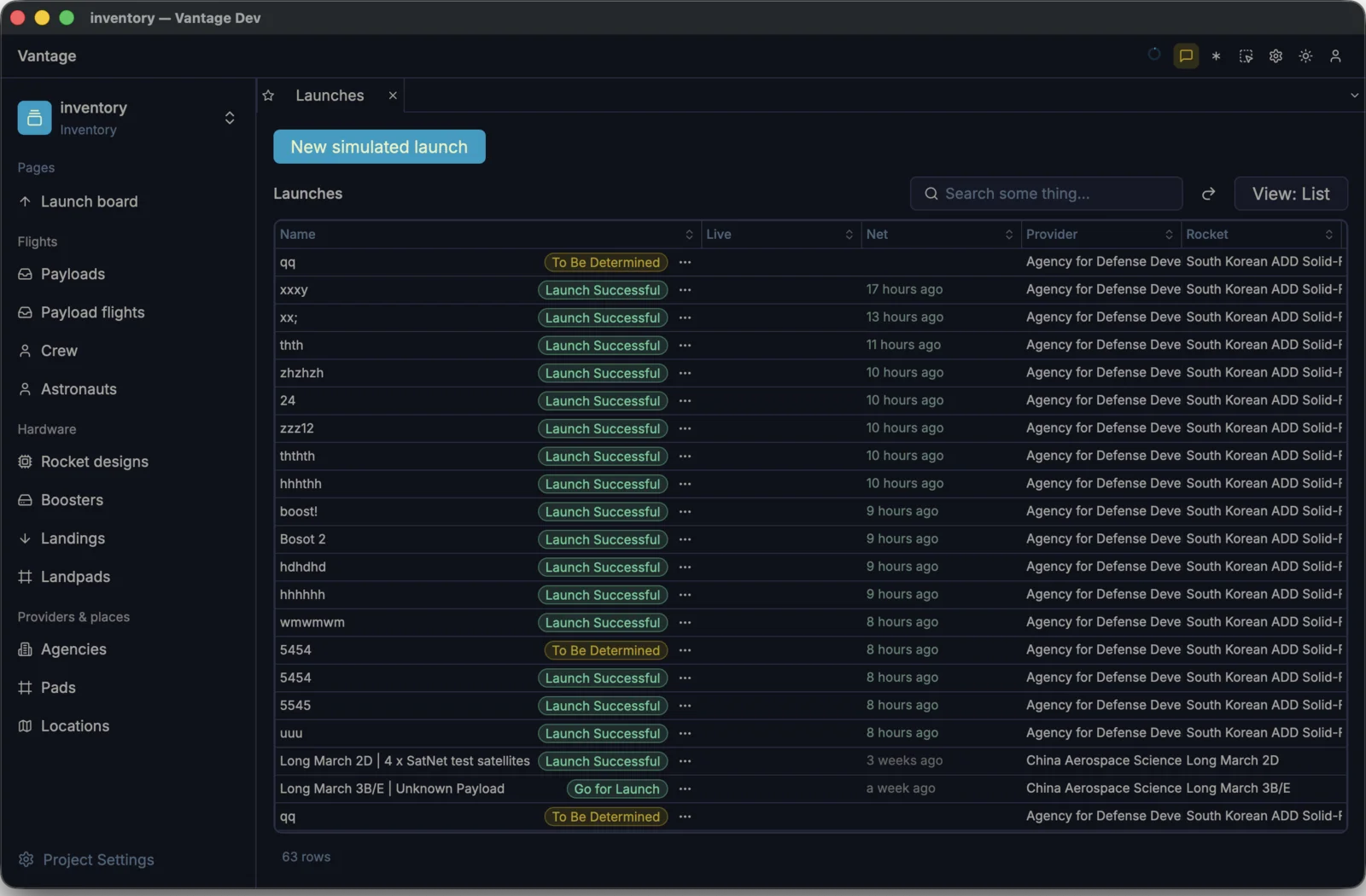
Everything on this screen, Vantage gives you for free — arbitrary REST endpoints as live tables, auto-refresh that never blanks, virtualized, auto-paginated CRUD grids, end-to-end type safety, a launch dialog with dependent dropdowns, master/detail binder layouts, tabbed navigation and themes — all of which, in a browser app, you would hand-write in TypeScript.
Reckon on it: ~30 typed entity interfaces plus their request/response codecs; a fetch layer with retry, backoff and an LRU cache keyed by query-plus-offset; a windowed virtual scroller diffing the ~40 visible rows out of tens of thousands; ~6 reducers for selection, sort, filter, pagination, refresh and error; a debounced 1 Hz poller reconciling in-flight writes against server state; ~12 form fields with cross-field validation and dependent-option refetch; optimistic mutations with rollback; theme tokens threaded through every component; 4 states — loading, empty, error, stale — across ~25 components and a handful of routed tabs. Call it ~20,000 lines of TSX, a few hundred type errors fought to zero, and 6–12 weeks before it stops flickering. Then host it.
Phase 02 / Telemetry
Telemetry, projected at full frame rate
One of the app's highlights is its live telemetry. It runs at a high frame rate, continuously estimating where the rocket is right now — altitude, velocity, acceleration — and every two to four seconds it snaps back to the real numbers the API reports. Smooth on screen, honest underneath.
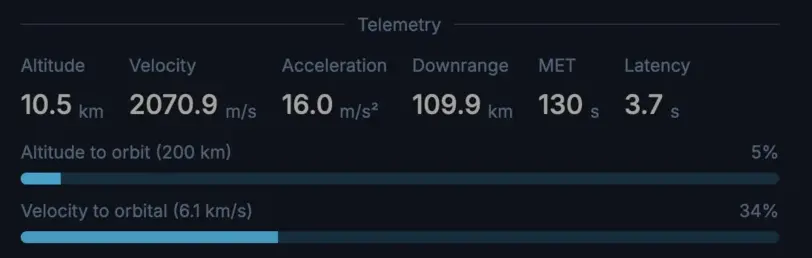
It takes two things, and both live in one view file. First, the presentation. The panel is a list of named widgets — separators, rows, stats, a countdown — each a few lines of YAML, no view code. The telemetry block is a separator and a row of three stats:
body:
  - kind: separator
    label: "Telemetry"
  - kind: row
    gap: 16
    repaint: 3hz                 # custom frame rate (see below)
    children:
      - kind: stat
        label: "Altitude"
        unit: km
      - kind: stat
        label: "Velocity"
        unit: m/s
      - kind: stat
        label: "Acceleration"
        unit: m/s²
repaint: 3hz sets a custom refresh rate. A view normally repaints only when its data changes; this one ticks three times a second so the projected numbers move smoothly between API samples.Second, the scripting. A raw
altitude_km only changes when the API answers — every few
seconds. To make it move every frame, each stat's value is a
snippet of Rhai that projects forward from the last
sample:
      - kind: stat
        label: "Altitude"
        unit: km
        # ×15 because our launch runs the real-time scenario 15× faster
        value: >
          ${ record.altitude_km + record.vertical_speed_ms / 1000.0
             * secs_since(record.last_updated) * 15.0 }
      - kind: stat
        label: "Velocity"
        unit: m/s
        value: >
          ${ record.velocity_ms + record.acceleration_ms2
             * secs_since(record.last_updated) * 15.0 }
The projection is only ever as right as that last sample: if the API stalls mid-flight it keeps climbing and sails the rocket clean past MECO — main-engine cut-off — into open space, until the next reading reels it back.
Phase 03 / Relationships
One summary page, a dozen tables
The data behind a single launch is scattered: the launch row itself, the agency that flies it, its rocket and pad, the crew aboard, the payloads riding up — across a dozen tables and as many API endpoints. Vantage pulls all of it onto one Summary page. And because this API can only be asked, never pushed, it keeps that page current by polling — once every couple of seconds today, and that's configurable.
Launch data is stored across 7 distinct tables, each served by its own REST endpoint.
Each relation is a line or two of YAML — a foreign-key
column with references: for a belongs-to, a references:
entry with kind: has_many for a has-many — declared once on the
table:
columns:
  # belongs-to: a hidden FK with `references:` → a clickable drill link
  - { name: rocket_configuration_id, flags: [hidden], references: launcher_configurations }
  - { name: pad_id,                  flags: [hidden], references: pads }

references:                  # has-many: one detail tab per relation
  crew:     { table: launch_crew,     kind: has_many, foreign_key: launch__id }
payloads: { table: payload_flights, kind: has_many, foreign_key: launch__id }And rendering it takes no query. The Summary's right column — total payload, the crew, the payload manifest — is just a few more widgets, each one following a relation:
body:
  - kind: stat
    label: "Total payload"
    value: >
      ${ unit(record.total_payload_mass, "kg") }

  - kind: separator
    label: "Crew"
  - kind: list
    ref: crew
    item:
      - kind: label
        text: "${ row.astronaut.name }"
      - kind: badge
        text: "${ row.role }"

  - kind: separator
    label: "Payloads"
  - kind: list
    ref: payloads
    item:
      - kind: label
        text: "${ row.payload.name }"
      - kind: stat
        label: "${ row.destination }"
        value: >
          ${ unit(row.payload.mass, "kg") }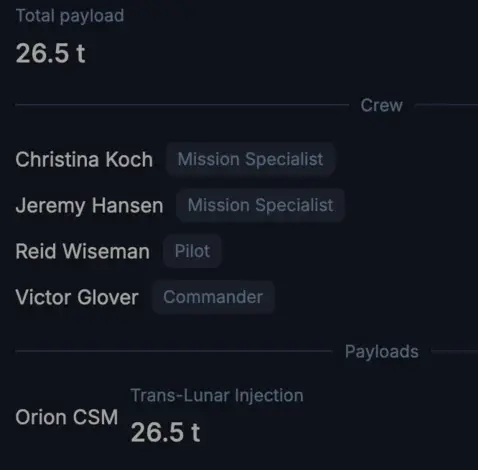
That ease is the point: a view traverses the
relationships for you. The crew list follows
crew into launch_crew, and each row reaches on
through to its astronaut — row.astronaut.name — so the name comes
straight from the astronauts table, no join to write. The payload
list does the same through payloads for each name and mass.
Phase 04 / Resilience
Built for adverse networks
The server is usually fine; the network between you and it often isn't — mobile data, hotel wifi, a train tunnel. Vantage is built so none of that reaches the screen: the app stays usable on an unreliable connection and recovers on its own. Two cases are worth walking through.
1 · Reading data
Two things can go wrong upstream: the API server can lag or answer with a
503, and the network in between can simply time out. Neither
reaches your eyes. Inside Vantage a cache and the UI sit together and talk
directly — in-process, no network — so the screen always renders from the
last good data, instantly, while fetches happen quietly behind it.
Faults live outside Vantage; inside, the cache and UI talk directly — so the screen never waits on the network.
2 · Editing data
Writes are eventually consistent. Vantage builds each change as an idempotent operation — applying it twice has the same effect as applying it once — so a write that fails or times out is simply retried until it lands, with no duplicates and no half-applied edits. You make the edit; Vantage makes sure it sticks.
3 · Many things at once
A browser tab is essentially single-threaded — pile on concurrent requests, a large dataset and a stream of live updates and it stutters. Vantage is native and multi-threaded, async to the core: fetching, caching and rendering run in parallel on real threads. It's polished machinery that scales to large data and dozens of live views at once — without lagging, dropping frames, or falling over.
Phase 05 / Dialogs & dropdowns
Forms that already know your data
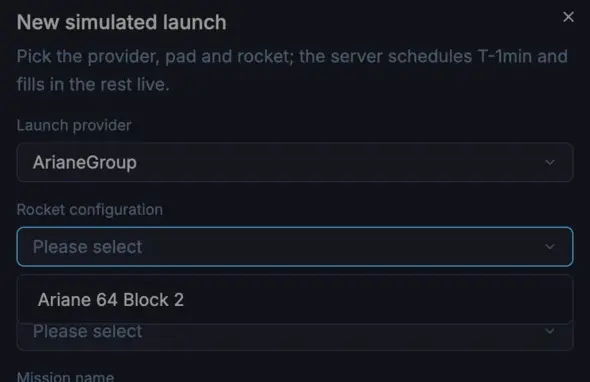
"New simulated launch" opens a dialog — and because the form is derived from
the launches table, its foreign-key fields render as real dropdowns, with no
options hand-listed. One is dependent: pick a provider and the
rocket list narrows to that agency's configurations, from
depends_on + filter_column alone.
kind: form
form:
  table: launches
  fields:
    - { name: lsp_id, label: "Launch provider", widget: dropdown }
    - name: rocket_configuration_id
      label: "Rocket configuration"
      widget: dropdown
      depends_on: lsp_id             # dependent dropdown:
      filter_column: manufacturer_id #   narrow to the chosen provider's rockets
    - { name: pad_id, label: "Pad", widget: dropdown }
    - { name: name, label: "Mission name" }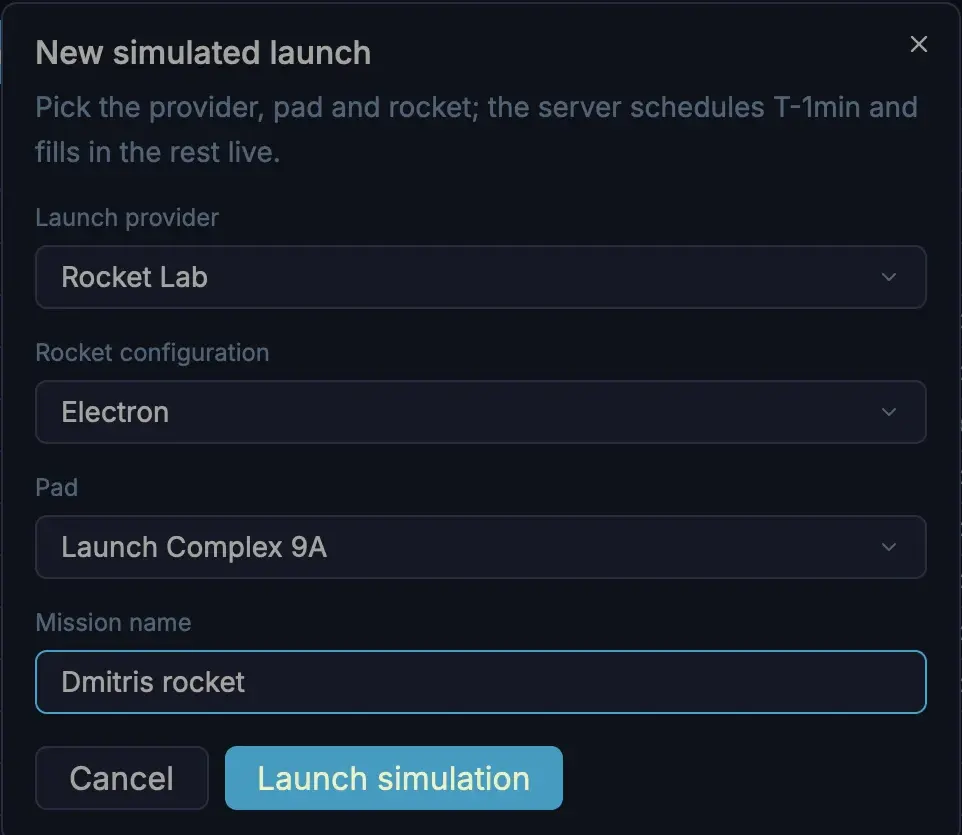
Phase 06 / Server included
The server ships with the example
The hosted demo is convenient, but you don't have to take our word for it — the whole backend is in the repo: a small Rust server (SQLite, served on the same Vantage framework the UI consumes). You can build and run it yourself in a couple of minutes. No Rust yet? Install the toolchain first:
# 1 · install the Rust toolchain (skip if you already have it)
curl --proto '=https' --tlsv1.2 -sSf https://sh.rustup.rs | sh

# 2 · clone the examples and start the bundled server
git clone https://github.com/romaninsh/vantage-ui-examples
cd vantage-ui-examples/apps/launch-control

cargo run -p launch-control-server -- seed     # seed SQLite from fixtures (once)
cargo run -p launch-control-server -- serve    # serve the API on :8080
Then point the example's datasource at your local server — one line of YAML:
type: api-client
url: "http://127.0.0.1:8080"    # ← was launch-control.vantage-ui.com
response_key: results
total_key: countserve --latency-min 200 --latency-max 1200 --error-rate 0.3 to
inject latency and fail a third of all reads — then watch Vantage stay calm.
That's Resilience, proven on your own machine.
Phase 07 / Extend it
Need more? Just ask your AI
Both halves are built from the patterns an AI coding agent is good at — typed Rust models and expressions on the server, declarative YAML on the front — and Vantage ships skills (task guides the agent loads on demand) for each one. So you describe what you want, and it makes the edits.
Ask for "a success rate on each agency," say, and it adds one
computed expression on the server — query_launches() is just
the with_many relation reused as a subquery, aggregated on
read:
Table::new("agencies", db)
    .with_id_column("id")
    .with_column_of::<String>("name")
    .with_many("launches", "lsp_id", Launch::table)
    // aggregates over the related launches — computed on read, not stored:
    .with_expression("successful_launches", |t| t.query_launches().count_successful())
    .with_expression("success_rate", |t| {                 // ← the new field
        sqlite_expr!(
            "ROUND(100.0 * ({}) / NULLIF(({}), 0), 1)",     //   successful / total %
            (t.query_launches().count_successful()),
            (t.query_launches().get_count_query())
        )
    })
Then surface it — one line in the table, rendered with its unit, no UI code:
columns:
  # …existing columns…
- { name: success_rate, type: float, unit: "%" } # ← appears in the gridThe same ask scales up: a new model and endpoint on the server, or a new table, page or view in the console. Each has a skill, so "add X" is usually a sentence — not an afternoon.
Phase 08 / Make it yours
The rocket is a stand-in for your launches
Everything you've seen — a generic app you download once, a console that's a folder of YAML, real-time data without plumbing, a UI that stays calm when the API doesn't, a field added in two lines — is the same shape you'd use to launch a campaign, ship a deploy, or run an overnight job. Less cinematic, identically built. And once it's a folder of YAML, you hand it around your organisation like any other file: check it in, diff it, distribute it.
Ready for launch
Open this example in one click, dig into the source, or start building your own.