React vs Vantage
Periscope (Headlamp clone)
Kubernetes (k8s) is the engine behind much of today's infrastructure — it runs the containerised apps that power a huge share of the modern web. Headlamp is a popular window into it — a dashboard for seeing what's running across a cluster (one Kubernetes setup). It's open-source, written in React, backed by the CNCF, and built over six years by hundreds of contributors.
A real test of Vantage is whether it can rebuild the kind of app our audience already relies on. So we set one: clone the core of Headlamp — the part that browses a cluster — with Vantage and three prompts to Claude Opus 4.8.
The result surprised us. Vantage passed — and the finished app is pure YAML with a few Rhai formulas, about 800 lines. It needed one new piece first: a driver teaching Vantage to speak Kubernetes. We wrote that once and shipped it in Vantage 0.20, so building Periscope today takes just those 800 lines. Here is the difference, graph by graph.
01 Lines of code you write
- Resource views~12,600
- Vantage UI~18,000
- K8s client~14,000
- Vantage Framework~8,000
- YAML + Rhai · the app~800
- ✓K8s clientbuilt-in · 0.20
- ✓Vantage UIincluded
- ✓FrameworkVantage (OSS)
02 The same window onto a cluster — drag to compare
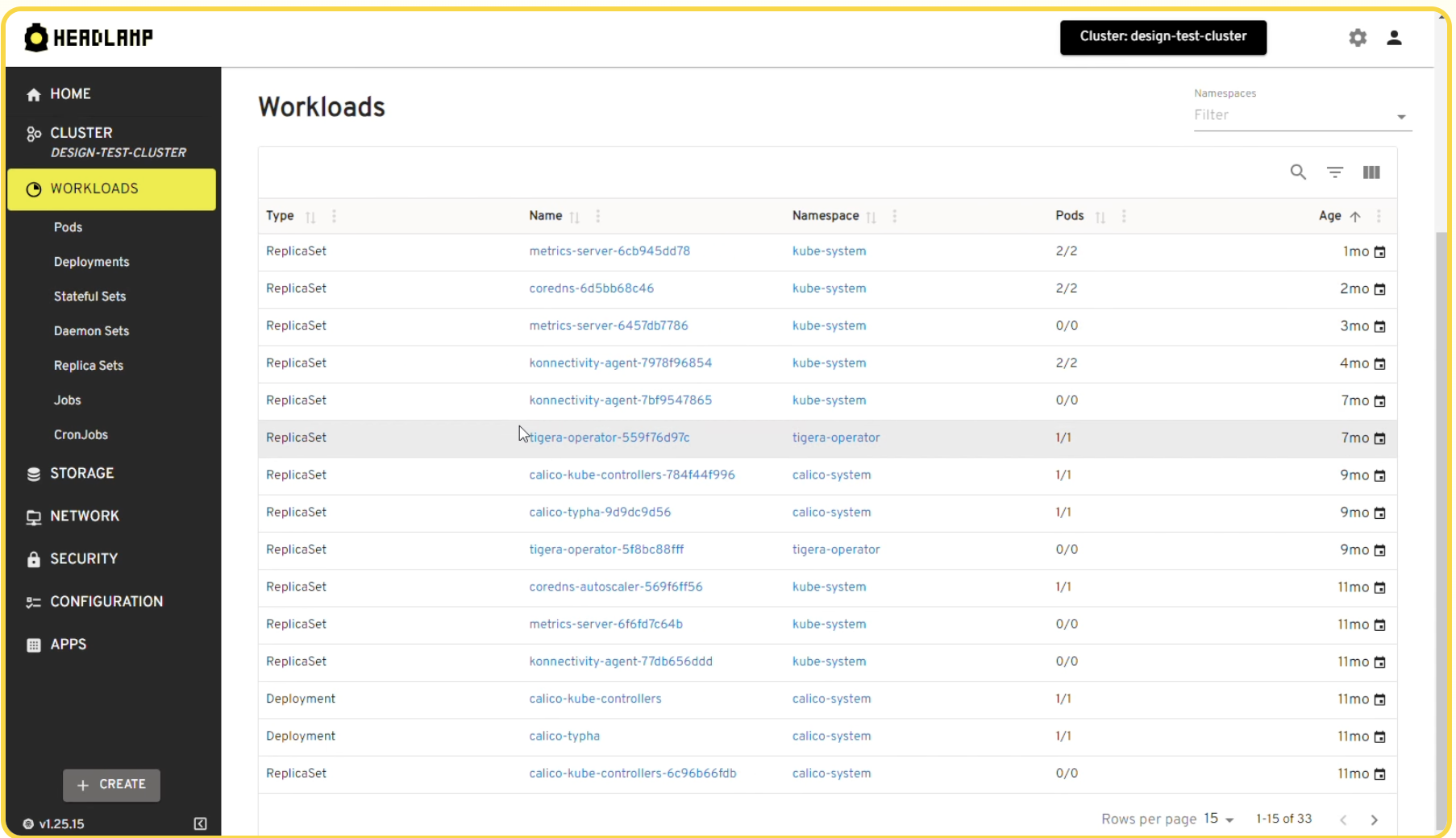 Headlamp · React
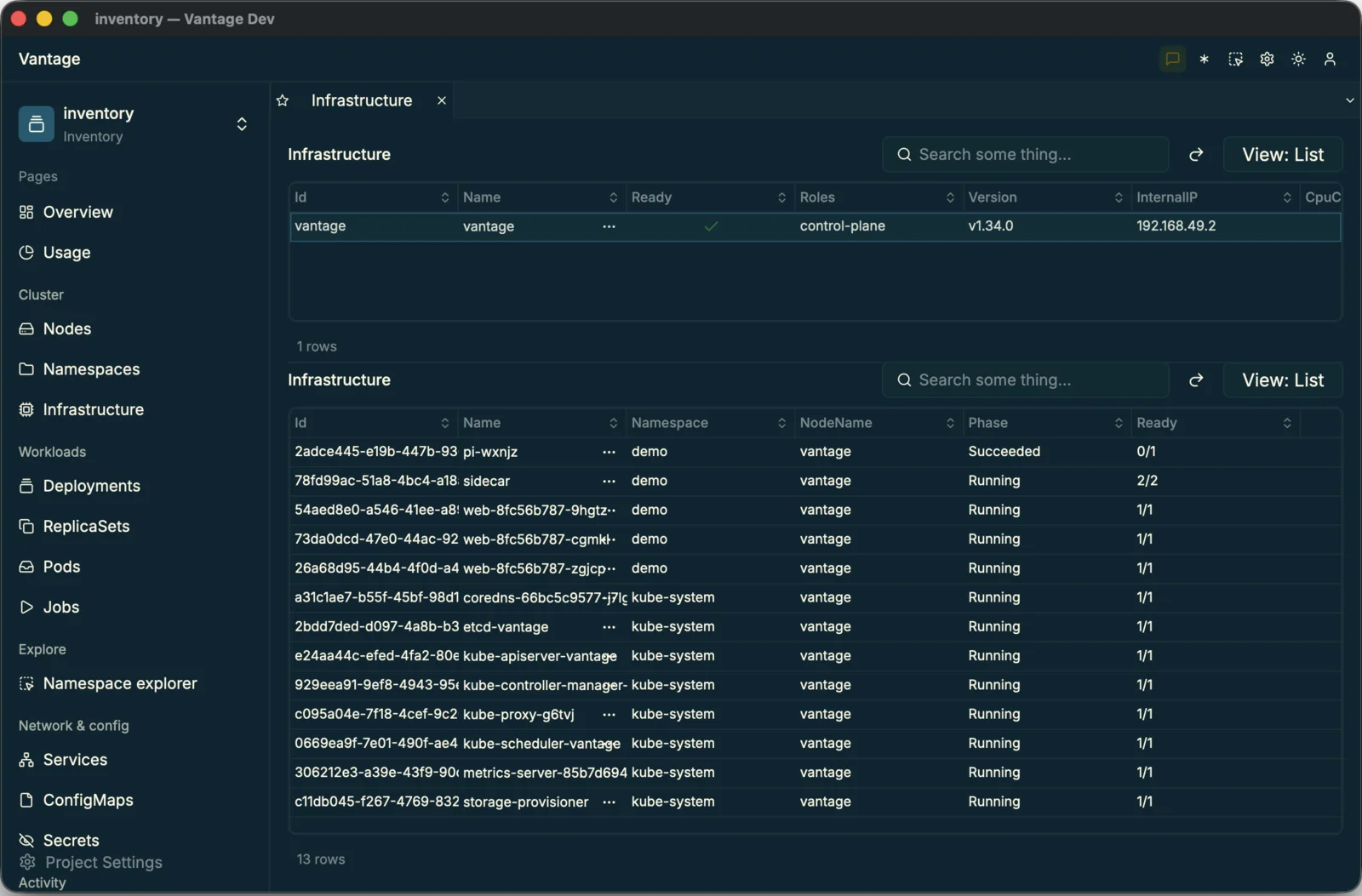 Periscope · Vantage
03 What you get, side by side
| HeadlampReact + Go | PeriscopeVantage | |
|---|---|---|
| Browse the cluster | ||
| Resources as related, drillable tables | ✓ | ✓ |
| Live metric dashboards | ✓ | ✓ |
| Summary & detail panels | ✓ | ✓ |
| Grouped sidebar & theming | ✓ | ✓ |
| Beyond browsing — Headlamp's advanced features | ||
| Edit & apply resources | ✓ | — |
| Plugins & extensions | ✓ | — |
| Multi-cluster | ✓ | — |
| RBAC, port-forward, exec | ✓ | — |
| Helm, topology map, search | ✓ | — |
| Cost to build & support | ||
| Lines of code you write | ~52,000 | ~800 |
| Time to build | ~6 years | an afternoon |
| People to build & support | ~330 contributors | 1 AI agent |
The ~52,000-line figure is Headlamp with its advanced features stripped out — the browse-and-view core only, the part Periscope reproduces. We are not rebuilding the rest (editing, plugins, multi-cluster, RBAC…) in Vantage; those are the next handful of prompts, not the next six years.
Prompt one
First, teach Vantage to read your cluster
Before we can build the Periscope app, Vantage UI has to be able to talk to your Kubernetes cluster directly — to query it live, in real time, the way Headlamp does. At the time of this experiment Vantage was at release 0.19, and it couldn't: it already connected to SQL databases, REST APIs and document stores, but Kubernetes was new to it.
Teaching it a brand-new backend is a documented path, written for an AI agent to follow. We pointed Claude Opus 4.8 at it and watched it work. Read the steps below for the plain-language story; expand any one to see how it was built.
Using Vantage docs and "vantage" open-source repository — implement a new DataSource that speaks the Kubernetes API. Stop when all steps are fully completed and tested.
psychologyVantage's docs contain a special guide for creating a new DataSource (or persistence) in nine concrete steps that I'll follow closely. Once the work is done and built into Vantage UI, it will speak the Kubernetes API.
1Step 1 · Type system
Step 1 is about lining up the data types. A capable database like PostgreSQL has dozens of them — lists, geographic points, and more.
The Kubernetes API needs far fewer, with two all its own: a Quantity (an amount of CPU or memory) and a Time. I implement every type it supports — with tests — exactly as the guide lays out.
expand_moreHow it's builtHide detail
Every backend has its own type system, and they vary wildly in size. A CSV gets by with one — everything is text. Vantage's SQLite type system has seven variants, Postgres fourteen, SurrealDB twenty-four. Vantage is strict about type boundaries and safety, so this first step defines that type system: the variants, the conversions to and from native Rust types, and clean round-tripping through CBOR / Serde. You declare it with a single macro:
vantage_type_system! {
    type_trait: KubeType,
    value_type: serde_json::Value,
    type_variants: [Null, Bool, Integer, Number, Quantity, Text, Time],
}
Kubernetes brings its own oddities — a Quantity and a
Time — and the Vantage type system takes them in stride. The
agent reads the guide and builds the right variants, so
"16331752Ki" becomes a real number you can sort and chart, and
"250m" a quarter of a CPU — not text.
2Step 2 · Expressions · skipped A powerful database server can run expressions itself — doing the work server-side and sending back only the data asked for. Vantage takes advantage of that whenever it can. So this step asks whether the Kubernetes API can run arbitrary expressions and server-side logic. The answer is no — so the implementation is skipped. expand_moreSee what's skippedHide detail
Many backends ship a query engine — SQL, SurrealQL, GraphQL. Vantage
supplies the mechanics for type-safe expression building:
with expressions, many operations run server-side, and Vantage takes full
advantage of that. The same primitives exist in both Rust and
Rhai — a CASE, for instance, reads the same either
way:
let kind = Case::new()
    .when(ident("status").eq("active"), "yes")
    .when(ident("status").eq("banned"), "no")
.else_("unknown");case_when()
.when(row["status"] == "active", expr("'yes'"))
.when(row["status"] == "banned", expr("'no'"))
.else_(expr("'unknown'"))
.expr()Not needed for Kubernetes — the API has no query language to build against, so the agent skips this step and filters the fetched list instead.
3Step 3 · Operators & conditions · skipped
Operators let a server filter rows before it sends them — =, !=, >, in(). Where a backend supports them, Vantage pushes the filtering down to it.
Does the Kubernetes API take conditions like these? Only the plainest — a simple = on a few fields. So most of this step is skipped, and the rest happens after fetching.
expand_moreSee what's skippedHide detail
Once a backend can run conditions, Vantage layers ergonomic, typed
operators onto columns — .eq(), .gt(),
.in_() — each producing that backend's native condition type.
How far they reach is up to the backend: SQL takes arbitrary expression
conditions, a document store maps them to its own operators, and some
sources support little more than equality. Each DataSource declares
and implements exactly the conditions it can honour — Vantage never
pretends a backend can filter in ways it can't.
table.add_condition(status.eq("active"));
table.add_condition(price.gt(100));.where(row["status"] == "active")
.where(row["price"] > 100)Not needed for Kubernetes — the API has no general query language to push a condition into, so the agent filters the fetched list in memory instead. Skipped.
4Step 4 · Query builder · skipped A query language lets you compose a precise request — pick columns, narrow rows, sort, even nest queries inside queries. Where that exists, Vantage assembles it properly. Can the Kubernetes API build a query like that? No — it just returns a whole list of resources. So this last query step is skipped too. expand_moreSee what's skippedHide detail
For backends that run queries, Vantage wants them implemented properly,
not faked. It introduces the Selectable trait — the standard
SELECT-builder interface — and the agent implements it for the backend's own
statement type. The variants are SQL-like and compose: fields, conditions,
ordering, limits, and nested sub-statements. Once a DataSource is
Selectable, the builder is safely exposed in both Rust and
Rhai:
SqliteSelect::new()
    .with_source("product")
    .with_field("name")
.with_field("price")select()
.from("product")
.field("name")
.field("price")Not needed for Kubernetes — a resource list comes back whole, with no SELECT to build, so the agent filters it in memory. Skipped.
5Step 5 · Table & CRUD
So far I've focused on individual capabilities; now I assemble them together, through the power of Vantage Tables. A Table is a collection of records you can create, read, update or delete — CRUD.
For Kubernetes those tables are quite specific: Pod, Node, Service, Deployment and the rest — the resources you actually browse.
expand_moreHow it's builtHide detail
Here the earlier pieces come together. The agent implements one trait,
TableSource, and on it declares the backend's types
— its value type, its condition (comparison) type, its select/source type, and
several more. The same trait spans everything from a flat CSV to
SurrealDB, one of the most feature-rich database servers; each
backend simply names the types it actually has.
impl TableSource for PostgresDB {
    type Value = AnyPostgresType;
    type Condition = PostgresCondition;
    type Source = SelectSource<PostgresSelect>;
    // + Column, Id, AnyType …
}impl TableSource for KubernetesCluster {
type Value = CborValue;
type Condition = KubeCondition;
type Source = String;
// no query language — just the kind
}Postgres declares a full Select-based source; Kubernetes, with
no query language, declares its source as a plain String — the
resource kind. That single line is exactly why the three query steps above were
skipped.
Implementing TableSource unlocks a Table: a typed
Table<DB, Entity> with ActiveRecord-style records, CRUD,
aggregates, ordering and pagination — none of which you write.
Table is Rust-only and highly typed; in a Rust application it's
what you reach for most of the time.
Reading it back is exactly what you'd expect — load the pods table and iterate its rows:
// load the pods table, then read every row
let pods = pods::pods_table(cluster);

for (_, pod) in pods.list_values().await? {
    let name  = pod.get("name");
    let ready = pod.get("ready");   // "1/1", "2/2", …
}
6Step 6 · Relationships
Tables don't exist in a vacuum — they're connected. A deployment is made of pods; a pod lives on a node. Vantage links tables with references, and in the UI those turn into drill-downs and sub-lists.
In this step I connect all the base tables correctly, so an expression like node.ref("pods") resolves to exactly the right rows.
expand_moreHow it's builtHide detail
Now Vantage's relationship engine comes on. You declare how records
relate — with_one for a belongs-to, with_many for
a has-many — and the UI picks them up on its own, turning every reference
into a link you can follow, with no per-screen wiring.
Table::new("replicasets", cluster)
    .with_many("pods", "owner_uid", Pod::table);  // a ReplicaSet → the pods it owns
How much a relationship can do depends on the backend. Vantage supports three levels — and since pushing work to the server is always cheaper, it prefers the higher ones. Pick a level:
Server-side conditions and subqueries. A relation can
carry expressions and aggregation — a client's
order_count computed as a correlated subquery on
read. launch-control builds its aggregation expressions exactly
this way:
.with_many("orders", "client_id", Order::table)
.with_expression("order_count", |t| {
    let orders = t.get_subquery_as::<Order>("orders").unwrap();
    orders.get_count_query()
})
Most REST APIs filter on the server, but only while fetching — folded into the path or query string, never as a subquery inside another query. Kubernetes lives here, with label and field selectors and owner-reference ids — enough for relationships to resolve cleanly:
- a deployment has many pods
- a node has many pods
- a namespace has many services
- a pod has one node
A CSV or a CLI can't filter at all, so Vantage fetches what it can and narrows the results in memory afterwards — the same link still resolves to exactly the right rows, just at the client.
7Step 7 · Checkpoint
Time to check the work so far. The guide prompts me to build a simple command-line utility and test it against a real Kubernetes cluster (minikube) — verifying the types, tables and relations I've built.
For a more advanced data source this checkpoint would also cover expressions, custom queries and advanced conditions — but Kubernetes has none of those, so the essentials are enough.
expand_moreSee it runHide detail
By now the data source has the whole stack — types, expressions,
conditions, queries, a typed Table and relations. The guide's
checkpoint is to build a small CLI, the fastest way to
exercise all of it against a real cluster. Because the backend type is
erased, the same generic CLI code runs over any Vantage model: it
fetches, filters with conditions and traverses relations, and
vantage-cli-util renders each result as a table.
Fetch a resource and filter it by namespace —
vantage-cli-util renders the result straight into the
terminal:

Then traverse a relation — a deployment down to the pods it owns:

Exactly the three pods that deployment owns — fetched, filtered and drilled, with no Kubernetes-specific code in the CLI at all. The checkpoint passes.
8Step 8 · Vista
So far this is perfect for a custom Rust project — but Vantage doesn't stop here. It turns to type-erasure, which lets tables be defined on the fly and connected to UI elements and API endpoints. The way Vantage seals a table like this is called a Vista.
With a Vista I can be honest about what each table can actually do — and given that reality check, Vantage auto-implements the missing capabilities on-the-client.
expand_moreHow it's builtHide detail
So far everything has been type-rich Rust resources — ideal for Rust
code, and invisible to everything else. To use that Table —
the DataSource you just built — outside of Rust, or in Vantage UI, those
types have to be sealed behind one uniform boundary. That
boundary is
Vista: a typed Table goes in, and out comes a
schema-bearing handle the UI, scripts and agents read over a plain
serialization boundary — no Rust struct needed on the other side.
As the table enters Vista it also declares the backend's capabilities. Queries? No. Conditions? Yes. Pagination? Yes. Consuming code reads these flags and adapts, so the same UI drives a SQL Vista, a Mongo Vista or this Kubernetes one without caring how it was built. Here is what the Kubernetes driver advertises:
| Supported | Unsupported |
|---|---|
countfetch the total number of rowsordersort by any columnsearchquick free-text searchset_page_sizechoose how many rows a page holdsfetch_pagerandom-access pages by numberfetch_nextcursor-style paginationfetch_windowoffset windows for lazy scroll |
insert / update / deletecreate, edit or delete resourcessubscribelive updates as the cluster changestraverse_to_setnarrow a relation with a subquerybuild_ref_via_scriptRhai-scripted reference traversal |
Some of the right-hand column are real limits — the API has no query
language, so server-side queries will never appear. But others the
Kubernetes API does support; the v1 driver just doesn't use them yet
— a live watch, server-side field selectors. They can be added
later to make the driver more powerful, and swapped in without
touching a line of code that uses Vantage — Vantage UI included.
9Step 9 · Scripting
Vantage UI ships as one prebuilt app, so I can't add fresh Rust to it. Instead, tables are declared at runtime — in plain YAML or short Rhai scripts it reads as it runs.
That's the real unlock: with no rebuild, you can point Vantage at your own Kubernetes resources — even custom ones — and add them to the UI yourself.
expand_moreHow it's builtHide detail
Vantage UI ships as one precompiled binary — you can't drop new Rust into it. So tables are declared in YAML or Rhai instead, both read at runtime. Here's the same deployments table, three ways:
# table/deployments.yaml
datasource: cluster
title: Deployments
table: apis/apps/v1/deployments
columns:
  - { name: name, flags: [title] }
  - { name: namespace, references: namespaces }
  - { name: replicas, type: int }
  - { name: ready, type: int }
references:
  pods: { table: pods, kind: has_many, foreign_key: ownerDeployment }
# the pods relation, narrowed by a Rhai script
references:
pods:
table: pods
kind: has_many
rhai: |
table("pods")
.add_condition_eq("ownerDeployment", row.name)
.add_order("name", "asc")Table::new("deployments", cluster)
.with_title_column_of::<String>("name")
.with_column_of::<String>("namespace")
.with_column_of::<i64>("replicas")
.with_column_of::<i64>("ready")
.with_many("pods", "ownerDeployment", pods_table);Two of those need no recompile — which is the real unlock: you can mix and match custom manifest types, pointing a table at a CRD to add it to Vantage UI without touching the binary.
The Kubernetes driver itself shipped in Vantage 0.20 and stays a built-in capability — so a cluster works out of the box, and YAML or Rhai is for the custom types you layer on top.
Claude Opus 4.8 implemented every step — and added the tests too — everything fitting Vantage's specifications, from a single, simple prompt.
This ran against Vantage 0.19; the finished driver shipped in
0.20 a few days later and is now built in. So the ~2,300 lines of
protocol code were a one-time cost — rebuild Periscope today and
it's just the ~800-line app. vantage-kubernetes lives in
github.com/romaninsh/vantage
alongside several other incubating crates, so a more refined driver can later take
over without changing a line of the app.
Vantage. Most modern frameworks are built by humans, for humans. Vantage is built by humans too — but aimed squarely at AI and human developers alike.
The new reality is that code is cheap: quick to write, and quick to rewrite. A sharper Kubernetes driver may already be on its way — and that's fine, because swapping a DataSource has little to no impact on everything built on top of it.
So whatever legacy or in-house API your organisation runs, you can give it a data source — and a real, browsable UI — with a single prompt, today. PR #323 is exactly that, in action.
Prompt two
Built into Vantage UI
The work so far was a bit of a detour. Chances are Vantage UI already supports the database — or API protocol — you use; Kubernetes was the exception. Speaking it needed a brand-new DataSource, wired by hand into Vantage UI's single, static binary — so that every user benefits from the new integration, not just us.
That wiring is a one-off, and it's mostly about shipping the Skills and Schemas that teach Vantage UI to use the driver. One prompt handles it:
add support for kubernetes to vantage-ui, using work you've done so far, exposing all capabilities, write the skill files and update version to 0.20
Vantage UI simply bundles open-source components and builds a UI around them. Adding a new data source is short, minimalistic work — a new dependency, and a safe authentication mechanism. Romans · Vantage
From there the change rides the same release pipeline as every Vantage build:
- Verify the DataSource. A suite of generic tests confirms the new implementation behaves like every other backend.
- Build a nightly. Vantage's rapid release channel publishes builds often, so the driver lands fast.
- BDD test-suite. An interactive behaviour suite checks the finished application against the sample apps.
- Release. The final pipeline publishes, and installed apps auto-update.
For commercial partners we produce dedicated builds — the public version mirrored, with custom DataSources and tweaks added — running through the very same release process and automated testing.
Prompt three
The control room, in YAML
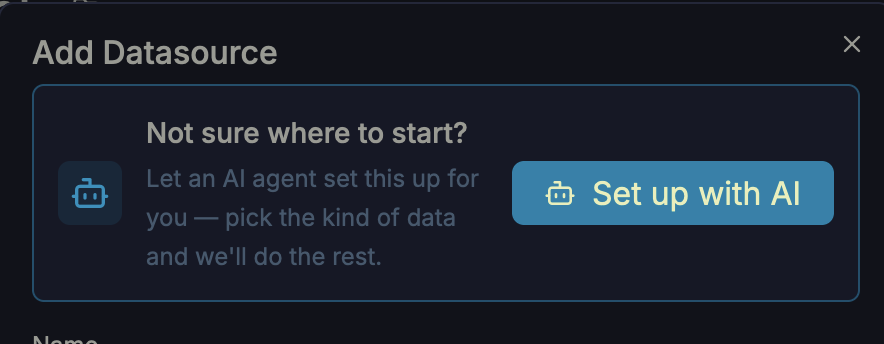
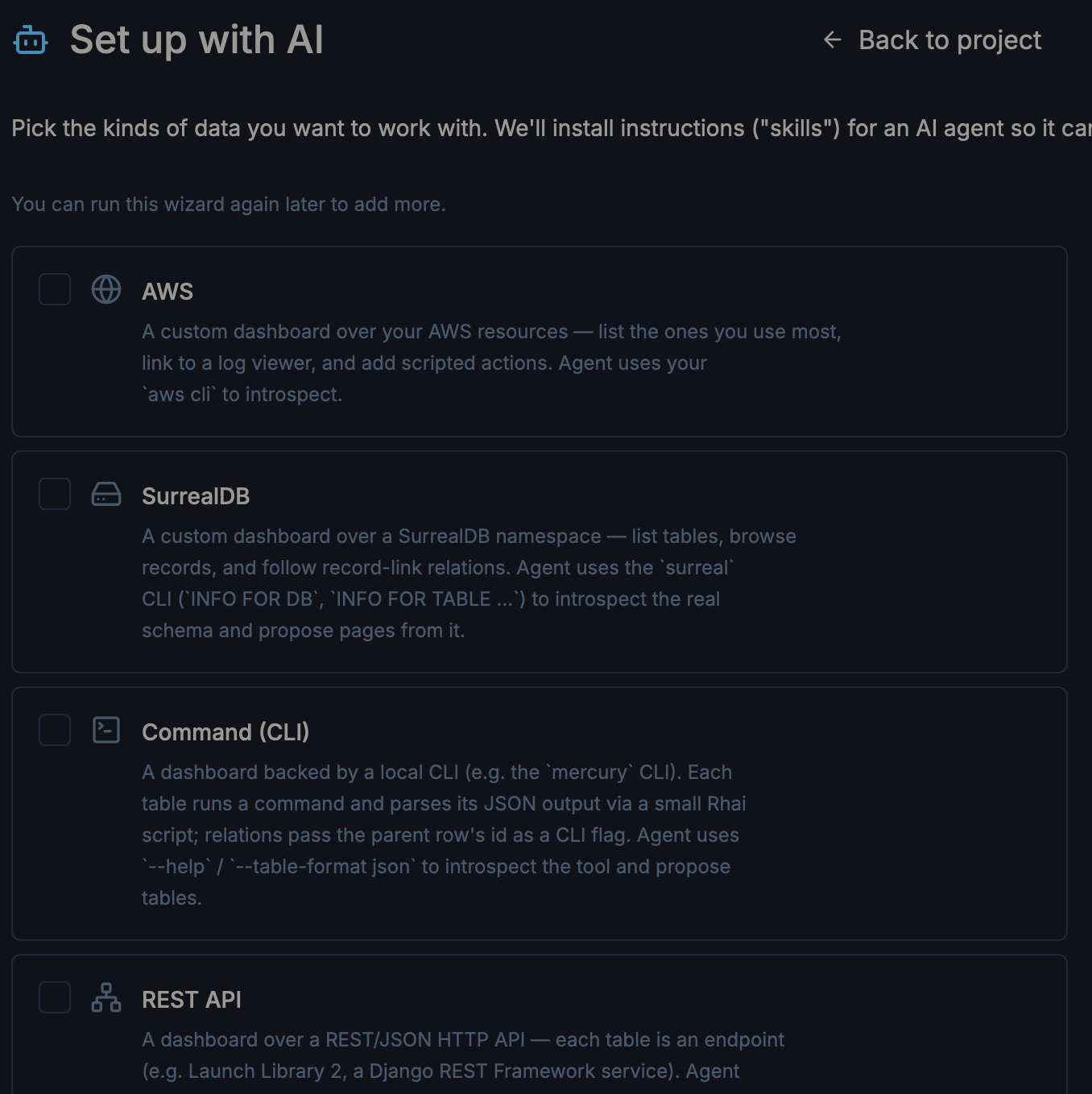
With the driver shipped in 0.20, building the app needs no setup of our own. We run Vantage 0.20 and follow its prompts: the Add data source dialog offers to set things up with AI, and the wizard installs the right Skills — the agent's instructions — into a fresh project.
Then we open that project folder with an AI agent and give it a single sentence:
Build a Headlamp clone and test it with local minikube
The agent wrote the whole control room as YAML — a dozen resource tables with drill-down relations, two live dashboards, bespoke Summary panels and a grouped, themed sidebar — then ran it against a local minikube cluster to check its work:
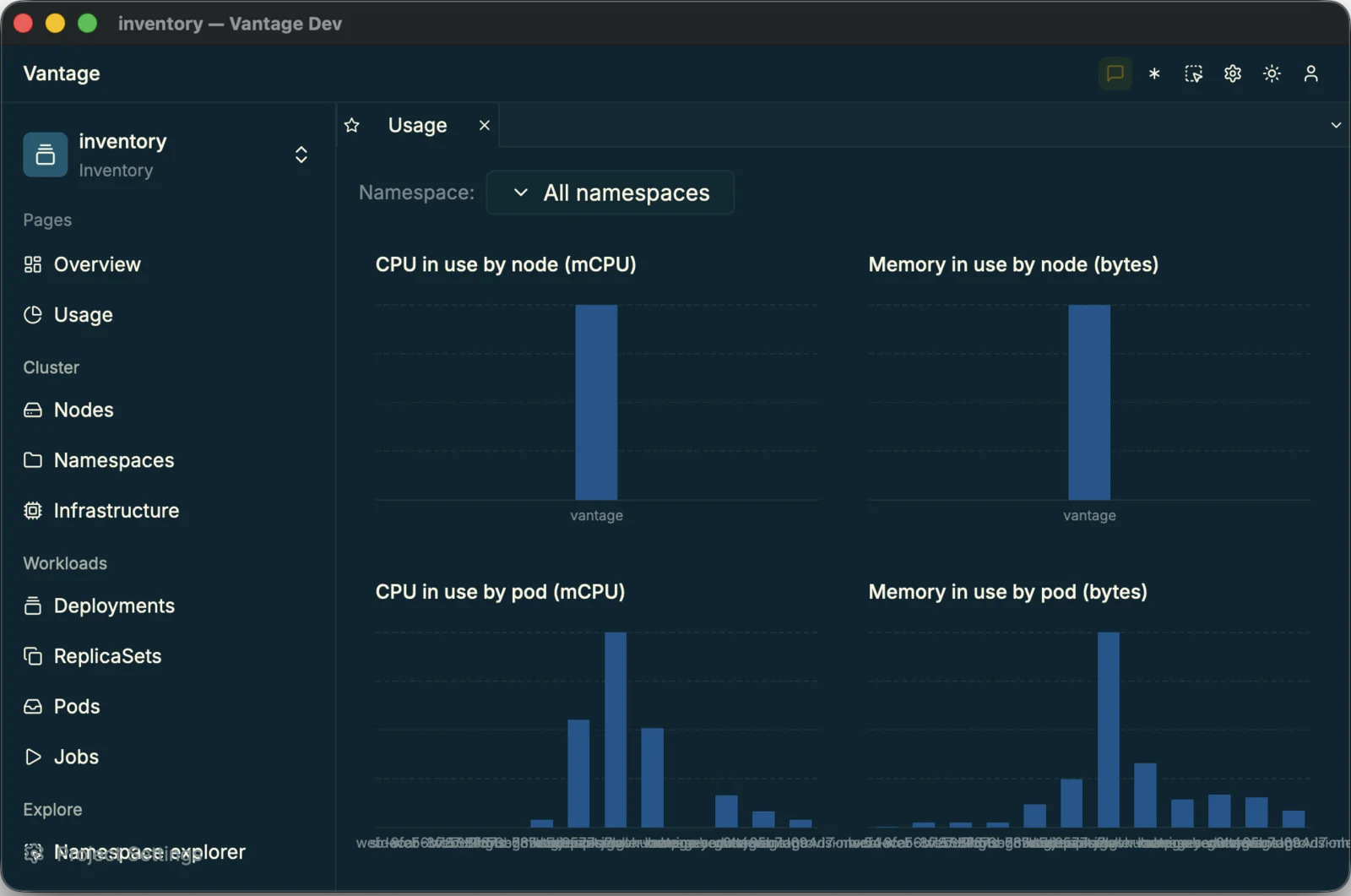
usage dashboard — live CPU/memory.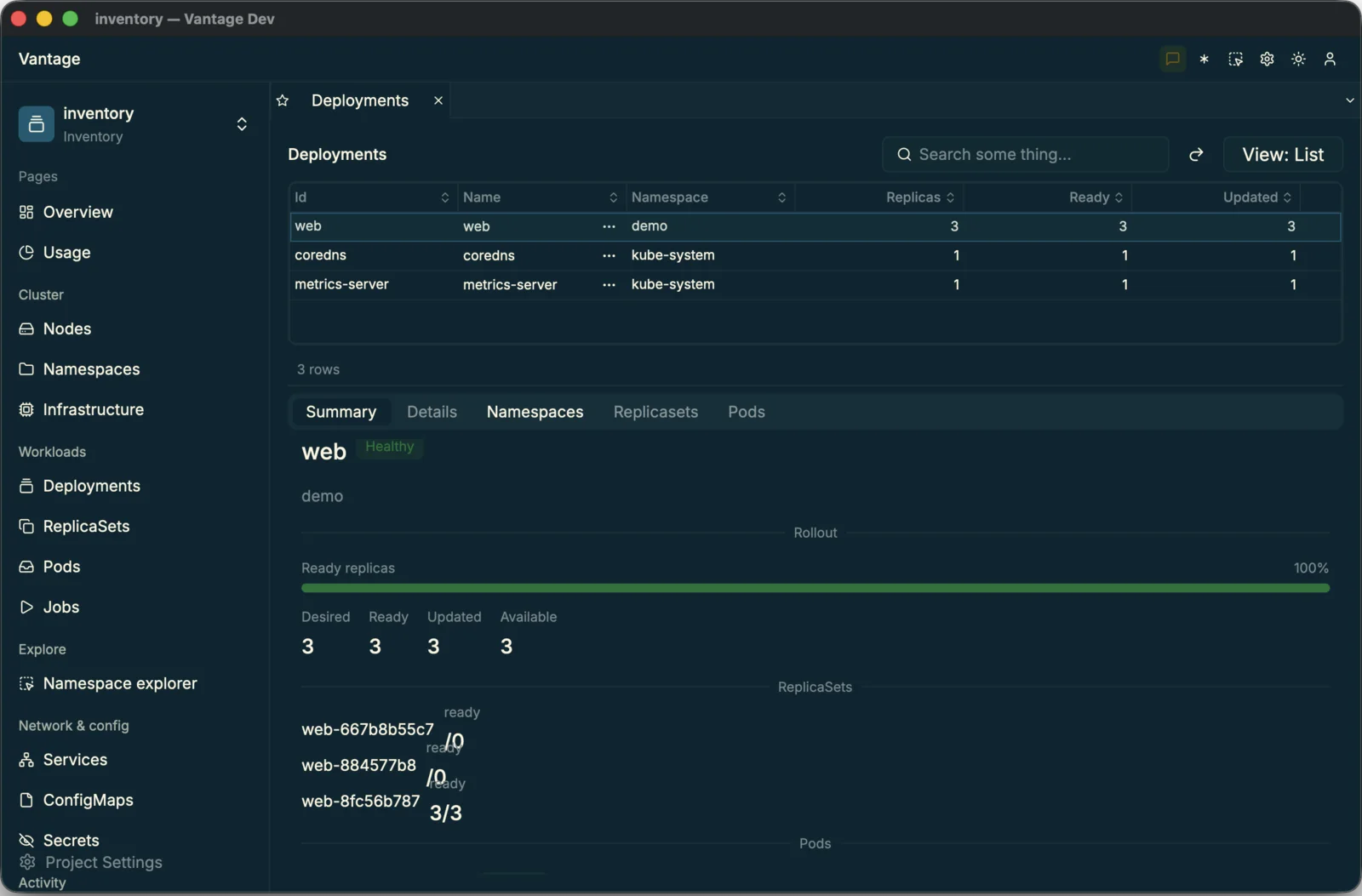
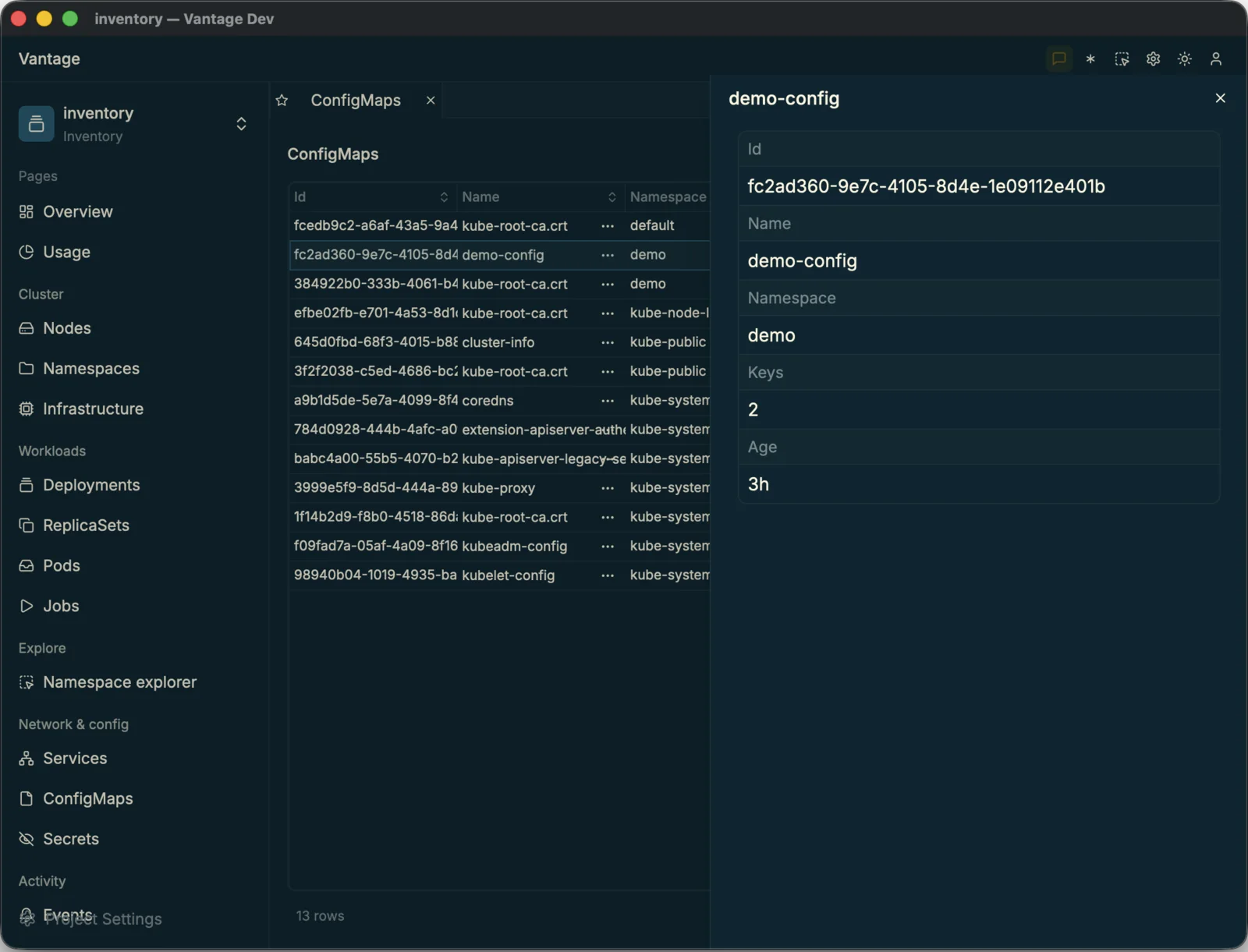
connected kubernetes cluster datasource=cluster,
dashboards bound to live node data.
Read PR #17.
The result
The treasure at the bottom
There's no chest down here. The treasure at the bottom of the dive is what
three prompts produced: a native Kubernetes datasource, a UI that speaks it,
and a full control room over a real cluster — zero lines of UI
code, no kubectl. Two of those prompts were one-offs, and
they've shipped: the driver is built into Vantage 0.20, so
today the control room is just the third prompt — an afternoon's work, not a
quarter's. The prize was never the app. It's the speed.
And it generalizes. Because Vantage is AI-ready end to end, you can point an agent at its guides and turn any backend — an API, a database, a CLI — into a drillable, related-table app. Periscope is what that looks like when the backend is a cluster. Yours could be anything you operate.
Surface with it
Read the source, follow the three prompts that built it, open it in Vantage 0.20 to drive your own cluster, or ask for a custom build for your own data sources.