React vs Vantage

Periscope

Building a control room for a Kubernetes cluster — nodes, pods and deployments as drillable tables, with live metrics — is normally a job for React, and it is enormous. We built the same thing a different way: in Vantage, with three prompts to Claude Opus 4.8, in an afternoon.

The yardstick is Headlamp — the open-source, CNCF-backed cluster UI, and about as good as the React way gets: six years of work, ~330 contributors, 100,000+ lines. That's what building it yourself costs. Here is the difference, graph by graph.

01Time to build
React · Headlamp~6 years
20192026
Vantage · Periscopean afternoon
02Lines of code you write
React · Headlamp~52,000 lines
  • Resource views~12,600
  • Vantage UI~18,000
  • K8s client~14,000
  • Vantage Framework~8,000
Vantage · Periscope~3,100 lines
  • Rust · K8s protocol~2,300
  • YAML + Rhai · the app~800
  • Vantage UIincluded
  • FrameworkVantage (OSS)
03People it took
~330React contributors
vs
1AI agent
04What each gives you
Vantage · an afternoon
Browse resourcesDrill relationships Live dashboardsSummary panels Sidebar & theming
React · years more
Edit & applyPluginsMulti-cluster RBACPort-forwardHelm Topology mapSearch

The experiment

Three prompts, start to finish

Vantage already turns SQL, REST and document stores into browsable, related tables — but it had never seen Kubernetes. So the run starts by teaching it, and ends with a running control room. Three prompts, each one move.

1 See the cluster

Teach Vantage to read the Kubernetes API

smart_toyPrompt 1 · Claude Opus 4.8

use the new persistence guide to add a data source for kubernetes, stop when done

Kubernetes doesn't hand back flat rows — it returns deeply nested objects, with numbers hidden inside strings like "16331752Ki", and relationships made of owner-references and label selectors instead of foreign keys. Following Vantage's own guide for adding a backend, the agent built a native data source that flattens all of it into typed, related rows.

deployed_code Out came vantage-kubernetes — a new crate, ~5,900 lines, 17 tests green. Written by the agent, reusable by anyone.
2 Wire it in

Make kubernetes a first-class data source

smart_toyPrompt 2 · Claude Opus 4.8

register the new vantage-kubernetes crate as a Vantage data source

A crate on its own is just a library. The second prompt threaded it through Vantage — a new data-source kind, a per-table query loader, connection plumbing that reads your kubeconfig, and an entry in the Add data source dialog — so any YAML app can say type: kubernetes and point at a cluster.

rocket_launch Threaded through the whole app in one prompt — and shipped as Vantage 0.20.

3 Build the control room

The whole app, described in YAML

smart_toyPrompt 3 · Claude Opus 4.8

build a Kubernetes cluster browser on the kubernetes datasource

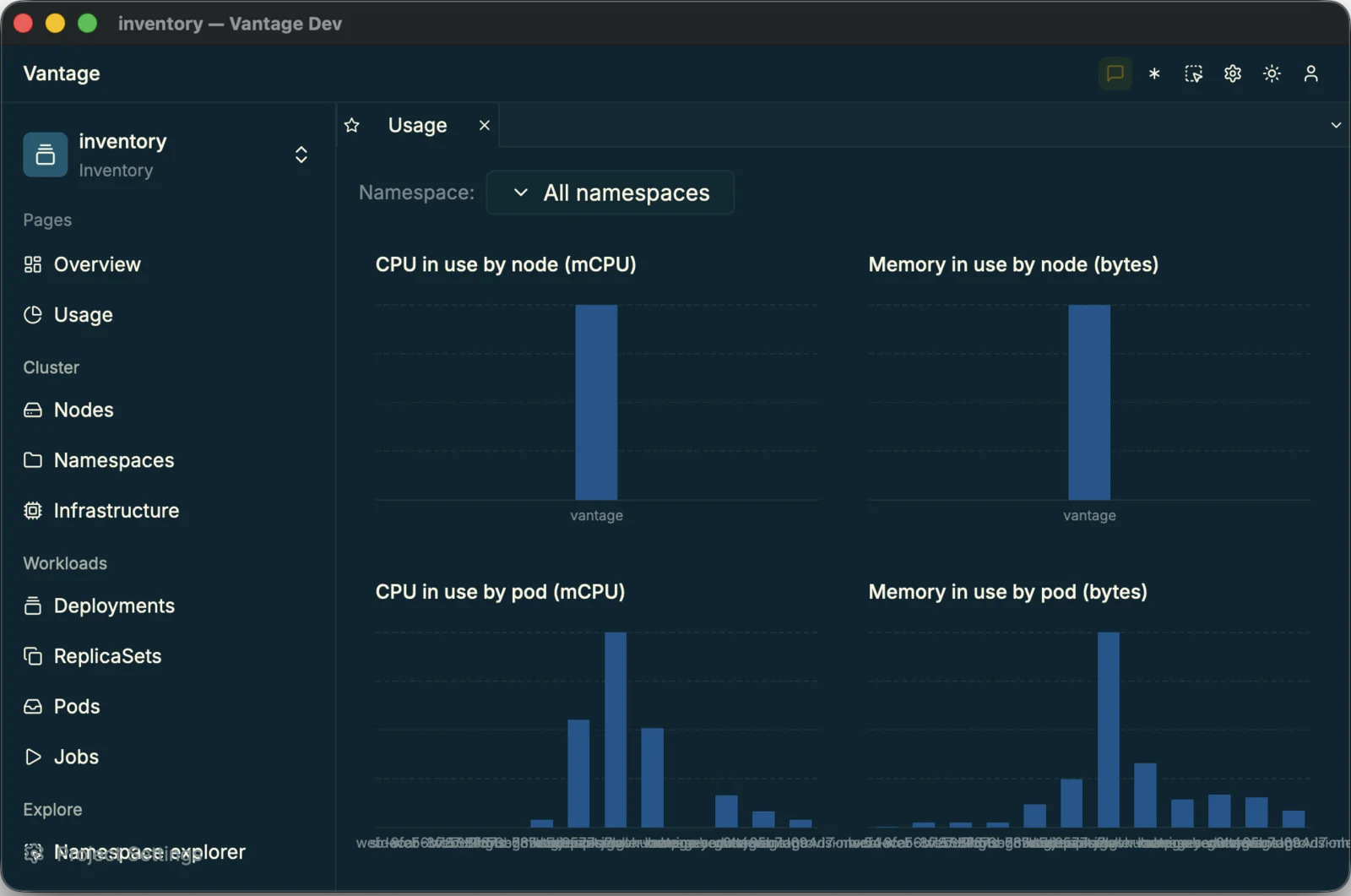
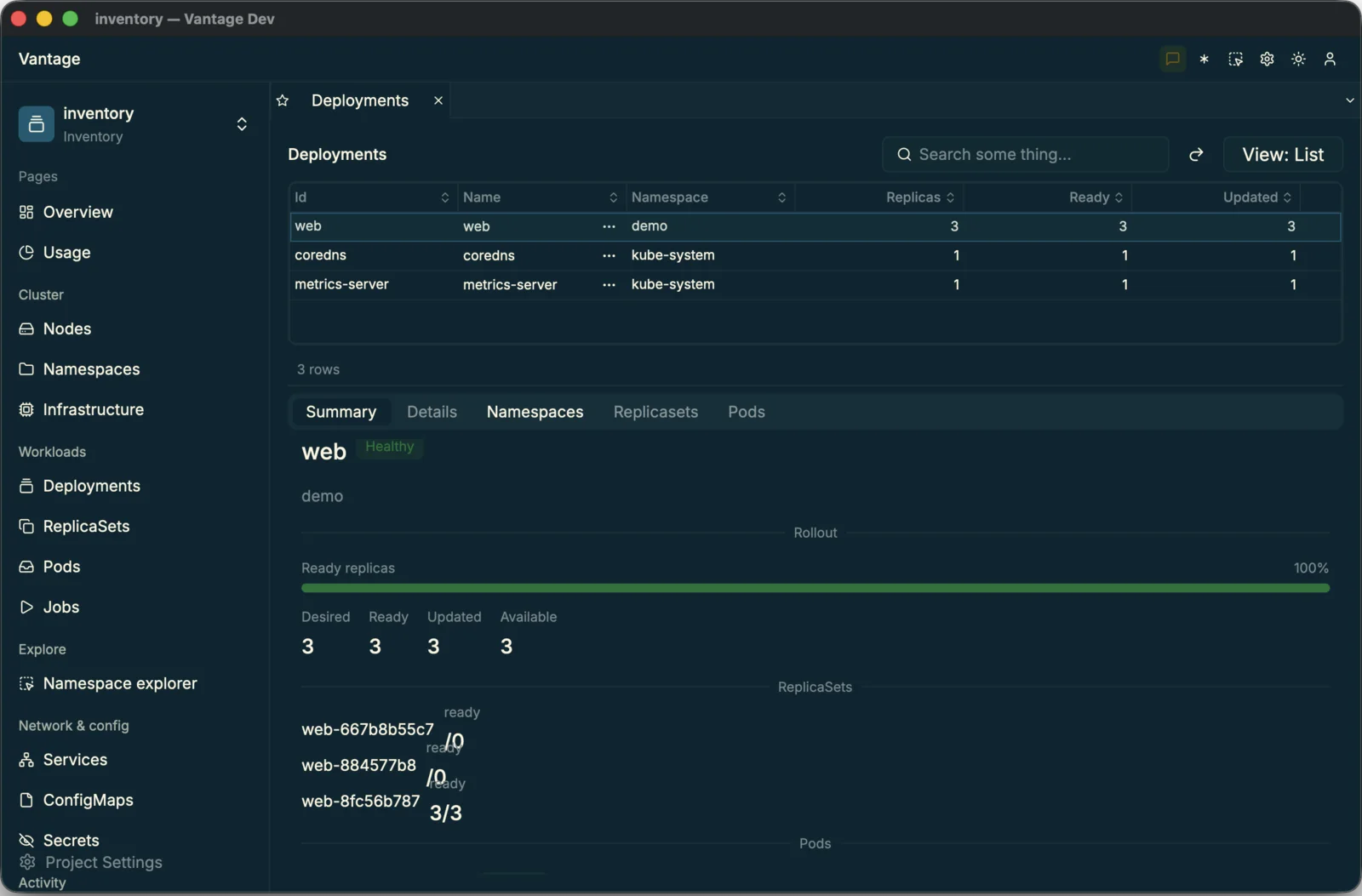
With a datasource Vantage understands, the last prompt built the app itself: twelve resource tables, the relations that drill between them, two live dashboards, bespoke summary panels, a grouped sidebar and a theme.

all_inclusive All of it as 32 YAML files and zero lines of UI code — validated against the real loaders, clean against a live cluster.

Periscope's Usage dashboard — live CPU and memory by node and by pod, with a namespace selector
The usage dashboard — live CPU/memory, re-scoped by namespace.
The Deployments grid with a rollout Summary view — health badge, ready-replicas progress bar and per-ReplicaSet status
A deployment's Summary view — badges, a rollout progress bar, stats.

The real result

The cluster was just the demo

The win was never a Kubernetes app. It's that Vantage is AI-ready end to end: point an agent at its guides and turn any backend — an API, a database, a CLI — into a drillable, related-table app, in an afternoon instead of a quarter. Periscope is what that looks like when the backend is a cluster. Yours could be anything you operate.

key

The Kubernetes backend lives in the private Vantage UI repository, so Periscope won't open in a stock download just yet.

Want to point Vantage at your own cluster? I'm happy to make you a custom buildopen an issue and say hello.

Build your own

Read the source, follow the three prompts that built it, or ask for a custom build to drive your own cluster.